




We are going to create a simple application which shows how to work with authentication/authorization with use of JSON
Web Token (JWT). There will be sign in, sign up, change password endpoints, and all data will be persisted in the
database. We will use Play Framework to build the REST API, Silhouette to implement an authentication/authorization
layer for our application, and PostgreSQL as a storage.
Most of the examples existing on the Internet don’t give enough information to understand how to work with Silhouette,
So I hope you will find the article useful enough.
Model and Structure
We will use the following user model:
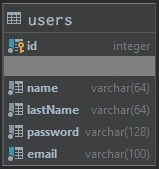
The technology stack is:
- Scala 2.13
- Play Framework 2.8.7
- Silhouette 6.1.1
- Slick 3.3.3
- PostgreSQL
- Guice
- Play evolutions
The project source can be found in this GitHub repository.
And the project structure is the following:
── play-silhouette-example
   ├── app                                     # The Scala application source code
   │   ├── utils
   │   │   └── auth                            # Authentication utils
   │   ├── models
   │   │   ├── tables                          # Slick tables
   │   │   │   └── UserTable.scala             # Represents user table
   │   │   ├── services                        # Contains UserService with its implementation
   │   │   ├── daos
   │   │   │   ├── PasswordInfoImpl.scala      # Password repository
   │   │   │   ├── UserDAO.scala               # user dao trait
   │   │   │   └── UserDAOImpl.scala           # user dao implementation
   │   │   └── User.scala                      # User model
   │   ├── modules                             # Play modules
   │   │   ├── BaseModule.scala                # Bind user dao and user service
   │   │   └── SilhouetteModule.scala          # Bind silhouette components
   │   └── controllers                         # Application controllers
   │       ├── SignUpController.scala          # Sign up controller
   │       ├── SignInController.scala          # Sign in controller
   │       ├── SilhouetteController.scala      # Abstract silhouette controller
   │       ├── IndexController.scala           # Index controller for path /
   │       └── ChangePasswordController.scala  # Change password controller
   ├── test
   ├── conf
   │   ├── messages                            # Messages for messages API
   │   ├── evolutions                          # Play evolutions SQL queries
   │   │   └── default                         # Default database
   │   │       ├── 1.sql                       # Creates schema
   │   │       └── 2.sql                       # Creates user table
   │   ├── application.conf                    # Play configuration
   │   ├── routes                              # Play routing
   │   ├── db.conf                             # Database configuration
   │   └── silhouette.conf                     # Silhouette configuration
   ├── public
   ├── project
   ├── build.sbt
└── targetProject Configuration
Here are all the dependencies we used in the project:
val playSilhouetteVersion = "6.1.1"
val slickVersion = "3.3.3"
val playSlickVersion = "5.0.0"

libraryDependencies ++= Seq(
 "com.mohiva" %% "play-silhouette" % playSilhouetteVersion,
 "com.mohiva" %% "play-silhouette-password-bcrypt" % playSilhouetteVersion,
 "com.mohiva" %% "play-silhouette-persistence" % playSilhouetteVersion,
 "com.mohiva" %% "play-silhouette-crypto-jca" % playSilhouetteVersion,
 "net.codingwell" %% "scala-guice" % "4.2.6",
 "com.typesafe.slick" %% "slick" % slickVersion,
 "com.typesafe.slick" %% "slick-hikaricp" % slickVersion,
 "com.typesafe.play" %% "play-slick" % playSlickVersion,
 "com.typesafe.play" %% "play-slick-evolutions" % playSlickVersion,
//it's org.postgresql.ds.PGSimpleDataSource dependency
 "org.postgresql" % "postgresql" % "9.4-1206-jdbc42",
 guice,
 filters
)PostgreSQL needs to be set up on your PC, and database properties for Slick should be set in the db.conf file. For example:
slick {
   dbs {
       default {
           profile="slick.jdbc.PostgresProfile$"
           driver="slick.driver.PostgresDriver$"

           db {
               driver="org.postgresql.Driver"
               url="jdbc:postgresql://localhost:5432/testdb"
               user="dima"
               password="your_password"
           }
       }
   }
}You can read more about Play Slick configurations here.
Next, we need to set properties for the JWT authenticator in the silhouette.conf. Here is our configuration:
silhouette {
   authenticator {
       headerName = "X-Auth"
       requestParts = ["headers"]
       issuerClaim = "Your fancy app"
       authenticatorExpiry = "3 hours"
       sharedSecret = "JWT secret"
   }
}| Property | Description |
|---|---|
| headerName | The name of the header in which the token will be transferred |
| requestParts | Some request parts from which a value can be extracted or None to extract values from any part of the request. In this case we use only the header |
| issuerClaim | The issuer claim identifies the principal that issued the JWT |
| authenticatorExpiry | The duration an authenticator expires after it was created. This means, if the timeout is set to 3 hours, then the authenticator expires definitely after 3 hours |
| sharedSecret | The shared secret to sign the JWT. You can generate a secret key here |
JWT is not the only authenticator supported by Silhouette. You can explore all available authenticators and their configuration here.
Environment Configuration
Since JWT is used for authentication, we need to configure the Play environment for this. There is a Play JWT environment, we use a trait that contains the user model as Identifier, and JWTAuthenticator.
trait JWTEnvironment extends Env {
 type I = User
 type A = JWTAuthenticator
}Identity and User Model
User model needs to extend the Silhouette’s Identity trait if we want to use the User instance as an entity that has to be authenticated.
case class User(
 id: Option[Long],
 email: String,
 name: String,
 lastName: String,
 password: Option[String] = None) extends Identity {

 /**
  * Generates login info from email
  *
  * @return login info
  */
 def loginInfo = LoginInfo(CredentialsProvider.ID, email)

 /**
  * Generates password info from password.
  *
  * @return password info
  */
 def passwordInfo = PasswordInfo(BCryptSha256PasswordHasher.ID, password.get)
}We use email field as a unique user key and Bcrypt hasher to hash the user’s password.
Slick User Table
Here is the User table projection, which allows Slick to work with the database table:
class UserTable(tag: Tag) extends Table[User](tag, Some("play_silhouette"), "users") {

 /** The ID column, which is the primary key, and auto incremented */
 def id = column[Option[Long]]("id", O.PrimaryKey, O.AutoInc, O.Unique)

 /** The name column */
 def name = column[String]("name")

 /** The email column */
 def email = column[String]("email", O.Unique)

 /** The last name column */
 def lastName = column[String]("lastName")

 /** The password column */
 def password = column[Option[String]]("password")

 /**
  * This is the table's default "projection".
  *
  * It defines how the columns are converted to and from the User object.
  *
  * In this case, we are simply passing the id, name, email and password parameters to the User case classes
  * apply and unapply methods.
  */
 def * = (id, email, name, lastName, password) <> ((User.apply _).tupled, User.unapply)
}We set the name of the database schema as play_silhouette and the name of the database table as users:
class UserTable(tag: Tag) extends Table[User](tag, Some("play_silhouette"), "users")It is necessary to define every field in the database table using column function. It describes the type and name of the column. Moreover, you can set additional options like a primary key or a unique constraint.
def * is a table projection function that is used to get or update the entire database table row.
Data Access Objects Implementation
To use Silhouette, we need to implement a LoginInfo repository and a PasswordInfo repository which Silhouette is using to get info about user authorization or authentication.
We also have to extend IdentityService[User]. This trait provides a method used by Silhouette to retrieve a user that matches the specified login info used for secured endpoints. We mix this trait with our UserService trait, which provides additional methods to work with the user entity.
/**
* Handles actions to users.
*/
trait UserService extends IdentityService[User] {

 /**
  * Saves a user.
  *
  * @param user The user to save.
  * @return The saved user.
  */
 def save(user: User): Future[User]

 /**
  * Updates a user.
  *
  * @param user The user to update.
  * @return The updated user.
  */
 def update(user: User): Future[User]
}To work with the User table, we need to create a class that will implement finding, saving, and updating users via UserTable class. It uses a configured PostgreSQL database instance and a UserTable instance.
/**
* Gives access to the user repository.
*/
class UserDAOImpl @Inject() (protected val dbConfigProvider: DatabaseConfigProvider)(implicit ec: ExecutionContext) extends UserDAO {

 private val users = TableQuery[UserTable]

 private val db = dbConfigProvider.get[JdbcProfile].db

 /**
  * Finds a user by its login info.
  *
  * @param loginInfo The login info of the user to find.
  * @return The found user or None if no user for the given login info could be found.
  */
 override def find(loginInfo: LoginInfo): Future[Option[User]] = db.run {
   users.filter(_.email === loginInfo.providerKey).result.headOption
 }

 /**
  * Saves a user.
  *
  * @param user The user to save.
  * @return The saved user.
  */
 override def save(user: User): Future[User] = db.run {
   users returning users += user
 }

 /**
  * Updates a user.
  *
  * @param user The user to update.
  * @return The saved user.
  */
 override def update(user: User): Future[User] = db.run {
   users.filter(_.email === user.email).update(user).map(_ => user)
 }
}And, finally, implement UserService:
/**
* Handles actions to users.
*
* @param userDAO The user DAO implementation.
* @param ex      The execution context.
*/
class UserServiceImpl @Inject() (userDAO: UserDAO)(implicit ex: ExecutionContext) extends UserService {

 /**
  * Retrieves a user that matches the specified login info.
  *
  * @param loginInfo The login info to retrieve a user.
  * @return The retrieved user or None if no user could be retrieved for the given login info.
  */
 def retrieve(loginInfo: LoginInfo): Future[Option[User]] = userDAO.find(loginInfo)

 /**
  * Saves a user.
  *
  * @param user The user to save.
  * @return The saved user.
  */
 def save(user: User): Future[User] = userDAO.save(user)

 /**
  * Updates a user.
  *
  * @param user The user to update.
  * @return The updated user.
  */
 def update(user: User): Future[User] = userDAO.update(user)
}To integrate our password dao with Silhouette, we need to implement a class that extendsDelegableAuthInfoDAO[PasswordInfo]. It’s a minimalistic use case of this class, which is used only to find and update a user’s password. For most cases, we just reuse UserDAO functionality.
class PasswordInfoImpl @Inject() (userDAO: UserDAO)(implicit val classTag: ClassTag[PasswordInfo], ec: ExecutionContext)
 extends DelegableAuthInfoDAO[PasswordInfo] {

 /**
  * Finds passwordInfo for specified loginInfo
  *
  * @param loginInfo user's email
  * @return user's hashed password
  */
 override def find(loginInfo: LoginInfo): Future[Option[PasswordInfo]] = userDAO.find(loginInfo).map(_.map(_.passwordInfo))

 /**
  * Adds new passwordInfo for specified loginInfo
  *
  * @param loginInfo user's email
  * @param passwordInfo user's hashed password
  */
 override def add(loginInfo: LoginInfo, passwordInfo: PasswordInfo): Future[PasswordInfo] = update(loginInfo, passwordInfo)

 /**
  * Updates passwordInfo for specified loginInfo
  *
  * @param loginInfo user's email
  * @param passwordInfo user's hashed password
  */
 override def update(loginInfo: LoginInfo, passwordInfo: PasswordInfo): Future[PasswordInfo] = userDAO.find(loginInfo).flatMap {
   case Some(user) => userDAO.update(user.copy(password = Some(passwordInfo.password))).map(_.passwordInfo)
   case None => Future.failed(new Exception("user not found"))
 }

 /**
  * Adds new passwordInfo for specified loginInfo
  *
  * @param loginInfo user's email
  * @param passwordInfo user's hashed password
  */
 override def save(loginInfo: LoginInfo, passwordInfo: PasswordInfo): Future[PasswordInfo] = update(loginInfo, passwordInfo)

 /**
  * Removes passwordInfo for specified loginInfo
  *
  * @param loginInfo user's email
  */
 override def remove(loginInfo: LoginInfo): Future[Unit] = update(loginInfo, PasswordInfo("", "")).map(_ => ())
}You can see that the add and save methods call the update method, so they are the same. We did it because, in this case, we don’t need other logic for these methods. All of these methods will update the user’s password.
Credentials Provider
Credentials Provider is a Silhouette class for authentication with credentials (login & password). It usesDelegableAuthInfo[PasswordInfo] which we implemented in the PasswordInfoImpl class to work with the user’s password storage and password hasher to hash and verify passwords.
You can use more than one Provider. For example, you can add social providers support to your API.
Read more about Providers in Silhouette’s official documentation.
Define Guice Modules
We use Guice for Dependency Injection. You can read about it here.
We need to bind the DAO and service classes to their implementations:
class BaseModule extends AbstractModule with ScalaModule {

 /**
  * Configures the module.
  */
 override def configure(): Unit = {
   bind[UserDAO].to[UserDAOImpl]
   bind[UserService].to[UserServiceImpl]
 }
}Besides, it is necessary to bind the crypter for authentication, authenticator service, password hasher, and already created classes like JWT environment, auth, password info dao, and other necessary Silhouette components.
Providing Environment as JWTEnvironment:
@Provides
def provideEnvironment(
 userService: UserService,
 authenticatorService: AuthenticatorService[JWTAuthenticator],
 eventBus: EventBus): Environment[JWTEnvironment] = {

 Environment[JWTEnvironment](
   userService,
   authenticatorService,
   Seq(),
   eventBus
 )
}Providing Crypter for JWT which uses secret key from silhouette.conf:
@Provides
def provideAuthenticatorCrypter(configuration: Configuration): Crypter = {
 new JcaCrypter(JcaCrypterSettings(configuration.underlying.getString("play.http.secret.key")))
}And providing AuthenticatorService which uses jwt configuration from silhouette.conf:
@Provides
def provideAuthenticatorService(
 crypter: Crypter,
 idGenerator: IDGenerator,
 configuration: Configuration,
 clock: Clock): AuthenticatorService[JWTAuthenticator] = {

 val encoder = new CrypterAuthenticatorEncoder(crypter)
 new JWTAuthenticatorService(JWTAuthenticatorSettings(
   fieldName = configuration.underlying.getString("silhouette.authenticator.headerName"),
   issuerClaim = configuration.underlying.getString("silhouette.authenticator.issuerClaim"),
   authenticatorExpiry = Duration(configuration.underlying.getString("silhouette.authenticator.authenticatorExpiry")).asInstanceOf[FiniteDuration],
   sharedSecret = configuration.underlying.getString("silhouette.authenticator.sharedSecret")

 ), None, encoder, idGenerator, clock)
}Password hasher which uses BCrypt password hashing function and SHA-256 algorithm:
@Provides
def providePasswordHasherRegistry(): PasswordHasherRegistry = {
 PasswordHasherRegistry(
   new BCryptSha256PasswordHasher(),
   Seq(
     new BCryptPasswordHasher()
   )
 )
}You can find the entire Silhouette module with Scala docs in the SilhouetteModule.scala file.
Silhouette Controller
In order to work with Silhouette components, we will create an abstract silhouette controller that will add silhouette
components to the default play controller. This is not required, but it will simplify work with Silhouette components.
abstract class SilhouetteController(override protected val controllerComponents: SilhouetteControllerComponents)
 extends MessagesAbstractController(controllerComponents) with SilhouetteComponents with I18nSupport with Logging {

 def SecuredAction: SecuredActionBuilder[EnvType, AnyContent] = controllerComponents.silhouette.SecuredAction
 def UnsecuredAction: UnsecuredActionBuilder[EnvType, AnyContent] = controllerComponents.silhouette.UnsecuredAction

 def userService: UserService = controllerComponents.userService
 def authInfoRepository: AuthInfoRepository = controllerComponents.authInfoRepository
 def passwordHasherRegistry: PasswordHasherRegistry = controllerComponents.passwordHasherRegistry
 def clock: Clock = controllerComponents.clock
 def credentialsProvider: CredentialsProvider = controllerComponents.credentialsProvider

 def silhouette: Silhouette[EnvType] = controllerComponents.silhouette
 def authenticatorService: AuthenticatorService[AuthType] = silhouette.env.authenticatorService
 def eventBus: EventBus = silhouette.env.eventBus
}Silhouette components that work with authentication/authorization:
trait SilhouetteComponents {
 type EnvType = JWTEnvironment
 type AuthType = EnvType#A
 type IdentityType = EnvType#I

 def userService: UserService
 def authInfoRepository: AuthInfoRepository
 def passwordHasherRegistry: PasswordHasherRegistry
 def clock: Clock
 def credentialsProvider: CredentialsProvider

 def silhouette: Silhouette[EnvType]
}Default silhouette components, which we will provide in the Silhouette module.
final case class DefaultSilhouetteControllerComponents @Inject() (
 silhouette: Silhouette[JWTEnvironment],
 userService: UserService,
 authInfoRepository: AuthInfoRepository,
 passwordHasherRegistry: PasswordHasherRegistry,
 clock: Clock,
 credentialsProvider: CredentialsProvider,
 messagesActionBuilder: MessagesActionBuilder,
 actionBuilder: DefaultActionBuilder,
 parsers: PlayBodyParsers,
 messagesApi: MessagesApi,
 langs: Langs,
 fileMimeTypes: FileMimeTypes,
 executionContext: scala.concurrent.ExecutionContext
) extends SilhouetteControllerComponentsMixes in play controller components with SilhouetteComponents
trait SilhouetteControllerComponents extends MessagesControllerComponents with SilhouetteComponentsAction Handlers
Before creating controllers, you need to know about UnsecuredAction and SecuredAction.
UnsecuredAction handles requests that don’t need any authorization.
SecuredAction handles requests only for authorized users. For our case, the user has to provide an X-Auth header with a valid JWT token value.
Also, you can create custom actions like adminSecuredAction. More information about actions in Silhouette documentation.
Creating Controllers
To use Silhouette in controllers, we need to extend the SilhouetteController class that was mentioned before.
Sign up controller:
class SignUpController @Inject() (
 components: SilhouetteControllerComponents
)(implicit ex: ExecutionContext) extends SilhouetteController(components) {

 implicit val userFormat = Json.format[User]

 /**
  * Handles sign up request
  *
  * @return The result to display.
  */
 def signUp = UnsecuredAction.async { implicit request: Request[AnyContent] =>
   implicit val lang: Lang = supportedLangs.availables.head
   request.body.asJson.flatMap(_.asOpt[User]) match {
     case Some(newUser) if newUser.password.isDefined =>
       userService.retrieve(LoginInfo(CredentialsProvider.ID, newUser.email)).flatMap {
         case Some(_) =>
           Future.successful(Conflict(JsString(messagesApi("user.already.exist"))))
         case None =>
           val authInfo = passwordHasherRegistry.current.hash(newUser.password.get)
           val user = newUser.copy(password = Some(authInfo.password))
           userService.save(user).map(u => Ok(Json.toJson(u.copy(password = None))))
       }
     case _ => Future.successful(BadRequest(JsString(messagesApi("invalid.body"))))
   }
 }
}This endpoint parses the JSON body and tries to find the user with this email in the database. If a user exists, the endpoint will return an HTTP 409 Conflict response, the user’s password will be hashed, and the user will be saved to the database.
Also, we use messagesApi to return the message text in the required language by their code. Messages are stored in a messages file. Those are base components to work with if you’d like to add i18n support to your API.
Sign in controller:
class SignInController @Inject() (
 scc: SilhouetteControllerComponents
)(implicit ex: ExecutionContext) extends SilhouetteController(scc) {

 case class SignInModel(email: String, password: String)

 implicit val signInFormat = Json.format[SignInModel]

 /**
  * Handles sign in request
  *
  * @return JWT token in header if login is successful or Bad request if credentials are invalid
  */
 def signIn = UnsecuredAction.async { implicit request: Request[AnyContent] =>
   implicit val lang: Lang = supportedLangs.availables.head
   request.body.asJson.flatMap(_.asOpt[SignInModel]) match {
     case Some(signInModel) =>
       val credentials = Credentials(signInModel.email, signInModel.password)
       credentialsProvider.authenticate(credentials).flatMap { loginInfo =>
         userService.retrieve(loginInfo).flatMap {
           case Some(_) =>
             for {
               authenticator <- authenticatorService.create(loginInfo)
               token <- authenticatorService.init(authenticator)
               result <- authenticatorService.embed(token, Ok)
             } yield {
               logger.debug(s"User ${loginInfo.providerKey} signed success")
               result
             }
           case None => Future.successful(BadRequest(JsString(messagesApi("could.not.find.user"))))
         }
       }.recover {
         case _: ProviderException => BadRequest(JsString(messagesApi("invalid.credentials")))
       }
     case None => Future.successful(BadRequest(JsString(messagesApi("could.not.find.user"))))
   }
 }
}Sign in endpoint checks if the user exists and if their password hash matches the password hash in the database. If the
login is successful, the application will return a response with status 200 and with a header X-Auth: “generated JWT token for current user”. Specifically, it is injected into the response by calling authenticatorService.embed(token, Status). We have to provide this token in the X-Auth request header for every endpoint that requires authentication. Sign in and sign up endpoints are unsecured, and they don’t need this header, but the next Change Password endpoint needs an X-Auth header.
Change password controller:
class ChangePasswordController @Inject() (
 scc: SilhouetteControllerComponents
)(implicit ex: ExecutionContext) extends SilhouetteController(scc) {

 case class ChangePasswordModel(oldPassword: String, newPassword: String)

 implicit val changePasswordFormat = Json.format[ChangePasswordModel]
 /**
  * Changes the password.
  */
 def changePassword = SecuredAction(WithProvider[AuthType](CredentialsProvider.ID)).async {
   request: SecuredRequest[JWTEnvironment, AnyContent] =>
     implicit val lang: Lang = supportedLangs.availables.head
     request.body.asJson.flatMap(_.asOpt[ChangePasswordModel]) match {
       case Some(changePasswordModel) =>
         val credentials = Credentials(request.identity.email, changePasswordModel.oldPassword)
         credentialsProvider.authenticate(credentials).flatMap { loginInfo =>
           val newHashedPassword = passwordHasherRegistry.current.hash(changePasswordModel.newPassword)
           authInfoRepository.update(loginInfo, newHashedPassword).map(_ => Ok)
         }.recover {
           case _: ProviderException => BadRequest(JsString(messagesApi("invalid.old.password")))
         }
       case None => Future.successful(BadRequest(JsString(messagesApi("invalid.body"))))
     }
 }
}The change password endpoint is a secure endpoint. It checks if the provided X-Auth header is valid and not expired. If the
The password was checked successfully, and the old password provided by the user will be compared with the password hash in the database. If passwords match, the application will update the user’s password; otherwise, it will send a 400 Bad Request response.
You can find routing in the routes file.
Running the Application and Testing Created Endpoints
Run the application with sbt run, open browser and go to https://localhost:9000/. At the start, we will see the message that we need to run the database migration script:
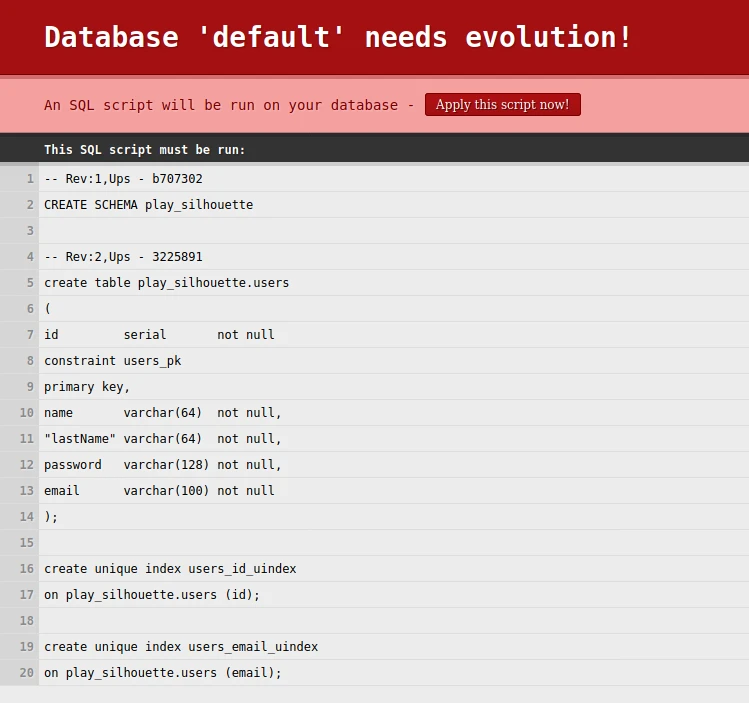
Click Apply this script to create a schema and a table in the PostgreSQL database. If the process succeeds, you will see a “Hello” message.
So now it’s high time to test our application. For this, we will use Postman, but you can use any REST client.
Let’s check the sign-up endpoint. We need to do a POST request with the User’s name, last name, password, and email in the body:
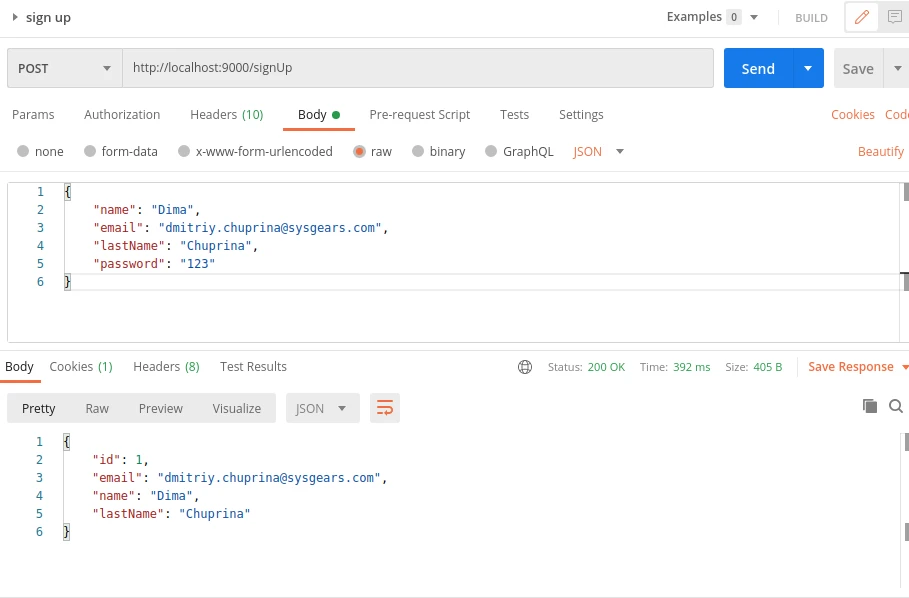
We got a response with an HTTP 200 code, which means the user was created successfully. So now we can sign in with login and password, which we used to sign up:
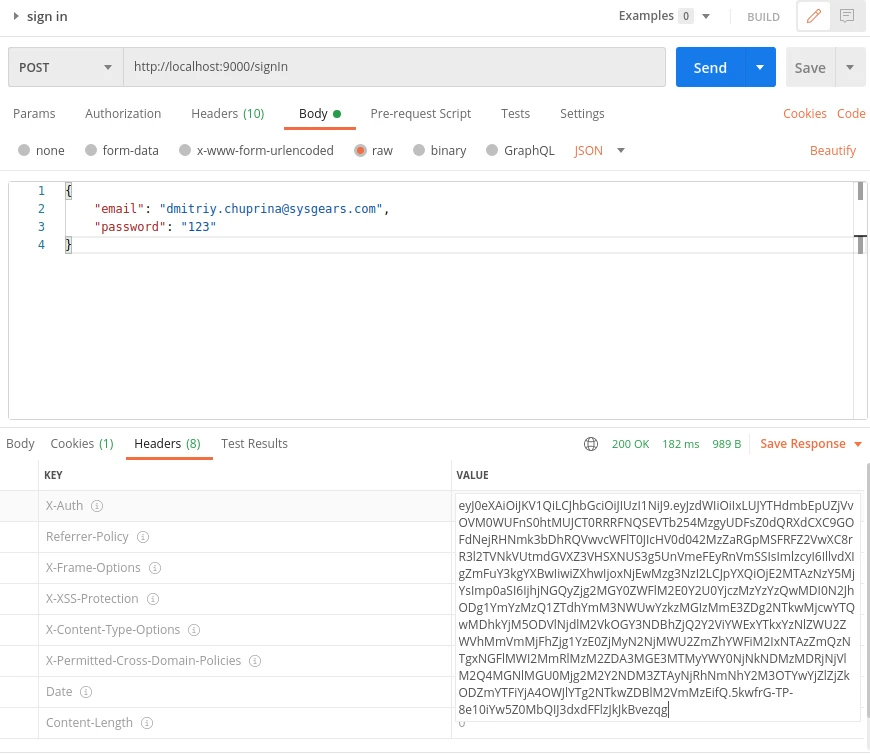
We got an HTTP 200 status and an X-Auth header with a JWT token. Let’s apply it to the change password endpoint because it’s secured.
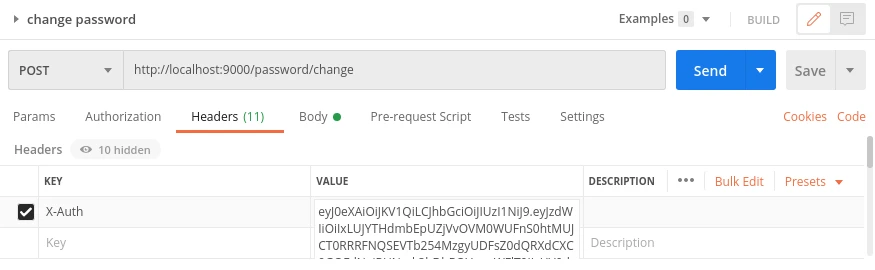
To do a password request, we need to add anX-Auth header from previous response to our request:
and add JSON body:

If the password is changed, we will get a response with an HTTP 200 status code. But if we make a request without an X-Auth header, or with an invalid JWT token for this header, or if it’s expired, we will get a 401 error like this:

That’s how you can create a RESTful api with Scala / Play using Silhouette for implementing JWT authentication.
Don’t hesitate to ask questions in the comments below if you want to know more!


