




Key takeaways:
- In 2026, React Native is a good fit for most business mobile apps and MVPs without platform-specific functionality.
- React Native reduces time to market and simplifies long-term maintenance, especially when most functionality is shared across iOS and Android platforms.
- The performance gap between native and React Native development has considerably narrowed over the past few years. The New Architecture, JSI, Fabric, TurboModules, and Hermes address many of the bottlenecks associated with earlier React Native versions.
- The React Native ecosystem is significantly more mature in 2026, with major improvements across architecture, rendering, animations, developer tooling, and build infrastructure.
- Native development is still a better choice for applications that involve heavy graphics, AR/VR, deep hardware integration, real-time media, or platform-exclusive capabilities.
React Native is one of the leading cross-platform frameworks that enables you to hire one team to build and maintain your product on both iOS and Android in parallel. By sharing much of the code between platforms, it helps reduce duplicated development, speed up time to market, and simplify long-term maintenance, while still allowing native code where necessary.
Yet, React Native isn’t a universal choice for every product. And here you are, standing at a crossroads: which development path should you take?
Here are the key questions to contemplate when deciding on the mobile app development approach:
- How quickly can I launch my app on iOS and Android?
- How many developers will I need?
- Can the chosen approach accommodate features I plan?
- How much effort will post-release maintenance require?
In this article, we’ll look at why React Native remains a go-to choice for businesses in 2026, what technical improvements recent releases have introduced, and which types of mobile products benefit from it most.
React Native vs. Native App Development
For most businesses developing a mobile app, the choice comes down to native development, where two separate iOS and Android applications are built, or cross-platform development, where much of the code is shared between both platforms. Let’s review them briefly:
| Factor | Native development | React Native development |
| Codebase | Separate iOS and Android codebases | Largely shared codebase |
| Team | Separate Android and iOS development teams (e.g., Swift and Kotlin developers) | One cross-platform development team |
| Time to market | Usually slower delivery and potential team coordination overhead | Faster parallel delivery |
| Performance | Maximum performance and optimization, great UX for smooth animations | Historically involved trade-offs; in recent versions, the gap has narrowed |
| Platform-specific capabilities | Full access to device capabilities and OS features, including GPS, camera access, and microphone | Can access native functionality, but complex platform-specific features may require native modules |
| Maintenance | The need to maintain two separate codebases and handle app updates separately | Both platforms can be synchronized easier due to shared business logic |
| Cost | May be higher due to the need to hire two separate teams on separate talent markets | Can reduce duplicated development and team overhead through a shared codebase |
| Best fit for | Products heavily dependent on graphics, hardware, real-time media, or platform-specific functionality | Faster market entry, apps with no highly platform-specific functionality, iOS and Android user reach without doubling budget |
In case of native app development, the main consideration is whether the additional platform control justifies the cost and complexity of building and maintaining separate iOS and Android apps. In our experience, a team of 2-3 cross-platform engineers can often deliver the exact same scope of work that would otherwise require 4-6 native developers (2 iOS + 2 Android, plus separate QA efforts).
As for React Native, the price of the shared codebase was a hit to performance — for many years. When it came to heavy 3D graphics, low-level hardware interactions, real-time video processing, or complex AR/VR experiences, native code was superior without reserve.
But does this performance gap still exist in 2026?
With modern smartphone hardware advancing rapidly and cross-platform frameworks undergoing major architectural overhauls, the line between native and cross-platform has blurred significantly. Over the past few years, React Native has fundamentally evolved, increasingly becoming standard for both startups and enterprises. Let’s explore why React Native stands out as the premier mobile stack in 2026.
Why Choose React Native in 2026: Architecture, Performance, and Tooling Updates
Before 2024, React Native has been working via Bridge, a mechanism for asynchronously exchanging JSON messages between the JavaScript and native components. Every call — layout measurement, gesture handling, or image loading — went through serialization, and this was the source of almost all performance complaints. The turning point was the release of React Native 0.76, in which the New Architecture became the default architecture for new projects.
The New Architecture is built on three components:
- JSI (JavaScript Interface) is a direct synchronous interface between JavaScript and native code, without serialization or bridges.
- Fabric is a new renderer that moves layout calculations to a shared C++ layer and directly synchronizes React fiber trees with native views.
- TurboModules is a new native module system with lazy loading, a module is loaded only when actually called, not at application startup.
Another important milestone occurred in early 2026, in version 0.84, the Hermes V1 engine became the default JavaScript engine, completely replacing JavaScriptCore. This is a separate change from the New Architecture, but they work together. Hermes is optimized for bytecode compilation, which results in significantly faster cold starts and lower memory consumption compared to JSC.
Based on my React Native project experience, I can recommend the following minimum stack for working with React Native in 2026:
| Instrument | Role | Status |
| Expo Router | File-based navigation | Production-ready |
| Reanimated 4 | Animations on UI-thread | Integration with Skia, up to 120fps |
| TypeScript | Default tools | Industrial standard |
| EAS Build | Assembly and OTA updates | Minimal configuration |
Separately, it is worth mentioning React Native ecosystem maturity. Migration to New Architecture was hampered for a long time by the fact that not all third-party libraries could keep up with the changes — we had to either wait for updates or keep the interop layer for compatibility with old modules. In 2026, this problem is practically solved, the vast majority of popular packages – Reanimated, Gesture Handler, FlashList and others – already natively support New Architecture, and the interop layer is needed less and less, mainly for highly specialized or long-unsupported libraries.
What Modern React Native Looks Like in Practice
Let’s take a typical case: a swipe animation that should remain smooth regardless of what the JavaScript thread is doing:
import Animated, { useSharedValue, useAnimatedStyle, withSpring } from 'react-native-reanimated';
import { Gesture, GestureDetector } from 'react-native-gesture-handler';


function SwipeableCard({ children }: { children: React.ReactNode }) {
 const translateX = useSharedValue(0);


 const gesture = Gesture.Pan()
   .onUpdate((event) => {
     // runs directly on the UI thread, without accessing JS
     translateX.value = event.translationX;
   })
   .onEnd(() => {
     translateX.value = withSpring(0);
   });


 const cardStyle = useAnimatedStyle(() => ({
   transform: [{ translateX: translateX.value }],
 }));


 return (
   <GestureDetector gesture={gesture}>
     <Animated.View style={cardStyle}>{children}</Animated.View>
   </GestureDetector>
 );
}The key point here is that the entire gesture handler runs on the UI thread via a worklet, rather than cycling data back and forth through a JavaScript thread every frame. This, not mere the fact that we use Reanimated, allows us to maintain high and stable frame rates even with a busy UI.
The same “less manual work” principle applies to the build process. In EAS Build, the profile configuration takes only a few lines:
{
 "cli": {
   "version": ">= 21.6.0",
   "appVersionSource": "remote"
 },
 "build": {
   "development": {
     "developmentClient": true,
     "distribution": "internal"
   },
   "preview": {
     "distribution": "internal"
   },
   "production": {
     "autoIncrement": true,
     "android": {
       "buildType": "app-bundle"
     }
   }
 },
 "submit": {
   "production": {}
 }
}From a single file, you can build both an internal test version and a production build for the store, without having to configure Xcode or Android Studio separately for each profile.
What does all this mean in terms of performance? React Native in 2026 delivers near-native performance for the vast majority of scenarios, like smooth scrolling, responsive animations, and complex interfaces. This doesn’t mean frame rates are guaranteed under all conditions, the JavaScript pipeline is still single-threaded, and heavy calculations can degrade it regardless of the architecture. But for a typical business application, the New Architecture removes virtually all the bottlenecks that were previously a source of complaints.
If a project has truly resource-intensive functionality such as complex 3D graphics, real-time video processing then React Native allows you to write this part natively (in Swift/Kotlin) and include it as a TurboModule, leaving the rest of the application in JavaScript. This isn’t a compromise between “everything in JS or everything native”, but the ability to selectively move only what’s truly needed to native code.
This isn’t just abstract theory. React Native in this configuration is already used in production at major companies, including Discord and Instagram, where it powers substantial parts of their applications. Shopify also relied heavily on React Native for its mobile ecosystem for years before announcing a move back to native Swift and Kotlin in September 2026. Importantly, this shift wasn’t driven by React Native failing to meet their needs — Shopify described its adoption as highly successful. Instead, advances in AI-assisted development changed the economics of maintaining separate native codebases, making a native-first approach more attractive for their specific context. But that’s a broader architectural discussion for another time.
Common React Native Development Concerns: What’s Still True in 2026
Despite massive improvements in recent React Native versions, many decision-makers and developers still hesitate to adopt React Native as their primary mobile stack. Most of this hesitation stems from outdated perceptions, criticisms that were entirely valid two or three years ago but no longer reflect reality.
So, let’s walk through the most common concerns one by one:
Do React Native Apps Feel Native?
This concern made a lot of sense in the early days of cross-platform development, but it fundamentally misunderstands how React Native works, especially now.
Unlike some other cross-platform frameworks that draw their own widgets on a canvas, React Native renders real native components. When you use a <ScrollView> or a <TextInput> in React Native, you’re getting the actual platform-native UIScrollView on iOS and native ScrollView on Android under the hood. This means you get native scrolling physics, platform-consistent UI elements, and familiar navigation patterns out of the box.
Combined with the performance gains from the New Architecture with synchronous layout calculations via Fabric and direct native calls via TurboModules, the user experience is virtually indistinguishable from a fully native app for the vast majority of use cases.
Is it Difficult to Build and Deploy React Native Apps?
If you tried React Native a few years ago, you probably remember the pain dealing with Xcode build settings, debugging Gradle dependency conflicts, managing CocoaPods versions, and spending half the sprint just getting the app to compile on a colleague’s machine. That reputation stuck, and honestly, it was well-deserved at the time.
Today, the combination of Expo and EAS Build have transformed this experience almost beyond recognition. The entire build and deployment pipeline is now configured through just two straightforward files.
The first is app.json — your application configuration file. It defines your app’s identity, platform-specific settings, and plugin integrations:
{
 "expo": {
   "name": "MyApp",
   "slug": "my-app",
   "version": "1.2.0",
   "ios": {
     "bundleIdentifier": "com.company.myapp",
     "buildNumber": "14"
   },
   "android": {
     "package": "com.company.myapp",
     "versionCode": 14
   }
 }
}The second is eas.json — your build configuration file. It defines your build profiles for different environments, we’ve covered the view of this file in the previous section. Once these files are in place, building your app is literally a single terminal command:
# Development build for testing on physical devices
eas build –profile development –platform all
# Production build for App Store / Google Play
eas build –profile production –platform ios
eas build –profile production –platform android
That’s it. The build runs on Expo’s cloud infrastructure, no need to maintain local Xcode or Android Studio environments for CI. Once the build completes, you download the .ipa or .apk, install it on your device, and use all React Native DevTools for debugging. The same workflow applies whether you’re building a development version for your QA team or a production release for the app stores.
Are React Native Apps Difficult to Debug?
Another complaint from the past is the poor debugging experience. Previously, the only way to debug JS code was Remote Debugging via Chrome, which was unstable and didn’t show the actual behavior of the app on the device, the code was executed in the browser, not in Hermes itself.
Starting with version 0.76, React Native has integrated React Native DevTools, a unified debugging tool that replaces Flipper and requires no additional configuration. It provides access to the console, breakpoints, network, and component state out of the box, and debugging occurs in the actual app environment, not in a browser emulation.
Is the React Native Ecosystem Mature Enough?
React Native has matured substantially over the past years, advancing continuously and simultaneously across multiple fronts: architecture, rendering, animations, developer tooling, and build infrastructure, all driven in parallel by Meta’s core team and a massive open-source community.
React Native has rebuilt much of its underlying stack through the New Architecture, Fabric, TurboModules, and Hermes, while its tooling ecosystem has expanded through solutions such as Expo, EAS, and React Native DevTools.
Case: How UberEats Traded Native Development for Faster Iteration with React
To see these principles play out, it’s worth looking at one specific, well-documented example. Uber Engineering rebuilt Restaurant Dashboard – the tool restaurant partners use to manage incoming orders — with React Native, choosing it deliberately over building two separate native apps. The motivation wasn’t primarily about performance, but iteration speed: the team could ship JS updates directly to users without waiting for an app store review.
What makes this a useful case study rather than just a marketing anecdote is that UberEats was explicit about the trade-off they were accepting, not just the upside. They weighed the stability risk that comes with that speed head-on. Unlike a bug caught in a staged native release cycle, a crash in the React Native layer reaches users in production immediately, so faster shipping meant a lower margin for error, not a free lunch.
Bundle pushes reduced but didn’t fully eliminate the need for normal app releases, since changes to native iOS or Android code still required going through the store. The trade-off paid off anyway: the React Native version of Restaurant Dashboard became a standard tool used by nearly every restaurant on Uber Eats.
And notably, that same codebase has been in continuous production since a time when React Native still ran on the old Bridge. It rode through the entire architectural shift described above (Bridge to JSI/Fabric to New Architecture) without a rewrite.
Business Benefits of Choosing React Native
Time to Market
One team and one codebase eliminate the very reason why native development takes longer, there’s no need to synchronize two parallel development tracks and wait for both platforms to reach the same point. And the EAS Update changes the very definition of a “release,” as a JavaScript change can reach users in minutes, rather than waiting through the store review cycle, as with any native change. It was this combination, not just one, that allowed the Uber team in the Restaurant Dashboard case to iterate as quickly as they did.
Costs and Talent Availability
The savings here aren’t just due to the notion that one team is cheaper than two, although that’s also true. There’s another layer, the React Native developer market is essentially a JavaScript/TypeScript developer market, one of the broadest in the industry. Finding a strong React Native specialist is, on average, easier than finding both a specialist with strong iOS and Android development skills, let alone two such specialists at once.
Cheaper Development Infrastructure
The development infrastructure itself is becoming simpler and cheaper. EAS Build handles cloud builds for both platforms, reducing the need to maintain dedicated macOS infrastructure for iOS builds and separate platform-specific CI pipelines.
Scalability and Long-Term Maintenance
A shared React Native codebase simplifies synchronization of iOS and Android apps as your product grows. When a bug needs to be fixed or business logic updated, it’s done once, not twice, with different implementation nuances in Swift and Kotlin. The longer a product lives and the more features it has, the more expensive this duplication tax becomes in the native approach, and the more noticeable the difference in favor of React Native becomes.
Is React Native a Good Fit for Your App? A Checklist
Now that we’ve gotten acquainted with React Native, let’s bring it down to a simple conclusion: when exactly should we use it, and when is it better to consider a native app?
It’s important to understand that React Native isn’t a silver bullet, but at this point, it fits many development needs.
But the main question here is this: should we use it?
To answer that, consider three things: what you are building, what technologies your team already knows, and how heavily the app depends on platform-specific functionality.
And if your app will mainly consist of a standard mobile interface and business logic, then React Native is a strong fit.
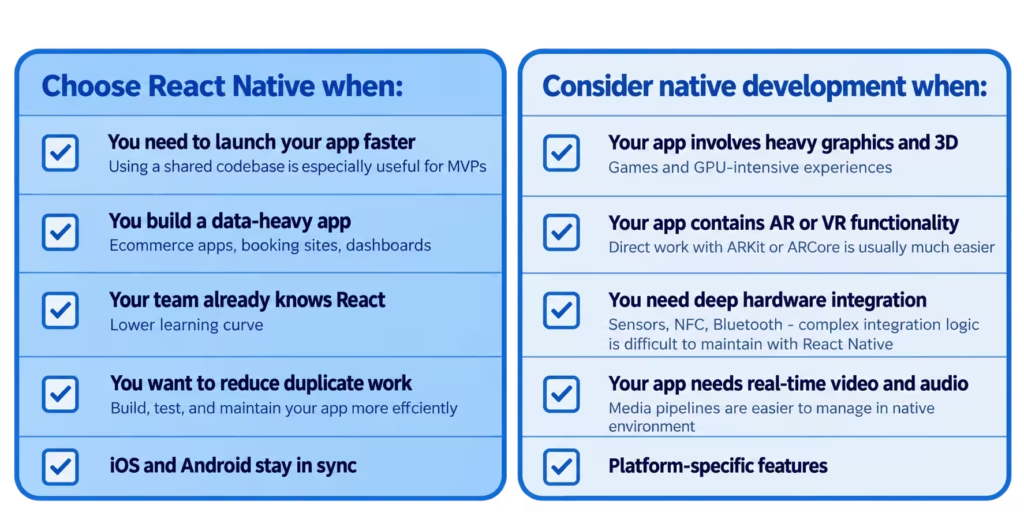
Choose React Native in the following cases:
- You need to get your app up and running quickly: you’ll have a single codebase for both iOS and Android, which allows you to implement an MVP faster and see firsthand how well your idea resonates with users.
- If your app will primarily consist of screens and data: for example, e-commerce, social media, booking platforms, marketplaces, and dashboards.
- Your team already has experience working with React: the learning curve will be minimal, and they’re already familiar with React’s core concepts and know how to work with components, hooks, and state.
- It’s important to you not to do the same things twice: with two separate native codebases, you’ll have to develop, test, and maintain each feature twice. With React Native, all of this is simplified, most of the work is shared, and you’ll also have direct access to the native parts of the platforms if needed.
- It’s important to you that the iOS and Android versions remain in sync.
When to consider a Native approach:
- If your app uses heavy graphics or 3D: games and GPU-intensive apps are typically built on a game engine or using native code.
- Your main product is AR or VR: React Native can handle AR features, but working directly with ARKit or ARCore is usually much easier.
- You need deep integration with the hardware: Bluetooth, sensors, NFC – React Native can work with these things via native modules. But if the interaction logic becomes more complex, it will be harder to maintain it through React Native.
- The main feature of your app is real-time video and audio: professional audio tools, video editors, live voice recording, anything where latency is critical requires strict control over the media pipeline, which is much easier to manage in a native environment.
- The platform-specific features are at the core of your product: if your app’s entire value comes from what only iOS or Android can do, don’t fight the platform. Embrace it.
Conclusion
Remember yourself standing at the crossroads at the beginning of this article: you had an app idea, but no app yet, and still had to decide how to build it and what kind of team you would need. By now, that choice should look less like a technology debate and more like what it actually is — a business decision.
Unless your app’s core value depends specifically on heavy graphics, deep hardware access, or platform-exclusive capabilities, React Native in 2026 isn’t a compromise anymore. It’s a mature, production-proven stack that gets you to market faster, with one team instead of two, and without locking you out of native code the moment you actually need it.
The real risk today isn’t choosing React Native and being wrong about it. It’s spending months debating the right stack while a competitor with a working MVP is already talking to your users.
TL;DR
React Native is a strong choice for many mobile products in 2026 because it enables one team build for iOS and Android with a largely shared codebase, which reduces duplicated development effort. Its New Architecture, improved performance, and more mature tooling have narrowed many of the gaps that historically favored native development. Native frameworks still make more sense when the product depends heavily on platform-specific capabilities, graphics, hardware access, and real-time media.
Check our blog to read more insights from our experts.
If you want to delegate React Native development or need tech advice, our senior React Native engineers can help.


