




Summary:
Agentic AI has reached a point where it can help streamline real business workflows. In this article, a SysGears QA engineer talks about how the majority of her routine administrative processes now only require her final verification, thanks to a team of artificial assistants that lets her focus on test design.
Imagine, for a moment, a mobile app that charges electric vehicles, letting you manage every kilowatt of power from the palm of your hand. From the outside looking in, it seems like a singular, streamlined, well-structured solution. In reality, underneath all that polished UI/UX, it’s a bustling city full of microservices: one handles the charging, another keeps track of tariffs, a third sends out notifications. There are also multiple brands sitting on top of the whole thing, each using both iOS and Android devices. A minor change in any area of that “city” can send an echo all the way up to the screen in front of the end user – and someone has to keep those changes from causing catastrophic crashes.
That someone is me. I’m a QA engineer, and I don’t write code – never have, actually. Despite that, I now have eight AI agents helping me with my daily work. Let’s have a closer look at how that happened.
The Initial Problem
It all started simple: I was tired. We use Kanban for workflow management, and tasks in Kanban don’t wait politely for the next sprint – they arrive, whether you’re ready for them or not, and in great numbers. I was genuinely juggling three streams at once: the move to a new version of our platform, new app builds, and changes to the layer between the app and the backend. Each stream comes with its own epics, release notes, and stories that need new tests. Find the ticket, find the epic, find the right test among a thousand lookalikes without accidentally using an outdated one, and keep track of every field and detail. Then report on what’s the status of each item, what passed, what’s blocked, and why it’s blocked.
At a certain point, I felt like I wasn’t even a tester anymore – I was a Jira secretary. I had no time at all left for the part of QA I actually love, which is sitting down and thinking through test design.
So I decided: I’m getting secretaries of my own. More specifically, a few first-class assistants I could send this whole paperwork merry-go-round to, so I could get back to actual testing.
First Steps Towards a Solution
“Hiring” them turned out easier than I thought it would be. An AI agent isn’t really a program in a traditional sense – it requires a set of instructions written in plain language: who you are, what you do, and what you must never do. Basically the same onboarding we give every new teammate. I wrote the instructions, walked the newcomer through the process, and kept a close eye on how they were doing at first. And in my opinion, explaining how something is supposed to work is a task that QA achieves better than anyone else.
I started carefully: with an agent that only looks things up — tickets, plans, epics — and touches nothing. Once I was sure it wasn’t making things up, I gave the next one more freedom: creating tests and plans. Before that I did a bit of reading on how agents work, and from then on it was a loop: I describe how I do the task myself, AI helps turn that into an instruction, I run the agent on a real task and watch where it slips up.
And slip up it did — quite a lot, so I had to watch closely. To its credit, it always corrected itself politely and without sulking. The first agents were like straight-A interns: I asked for a small set of tests and got an encyclopedia, and one test case came out longer than a washing machine manual. I had to explain what “short” means — in considerable detail.
Managing a Team of AI Agents
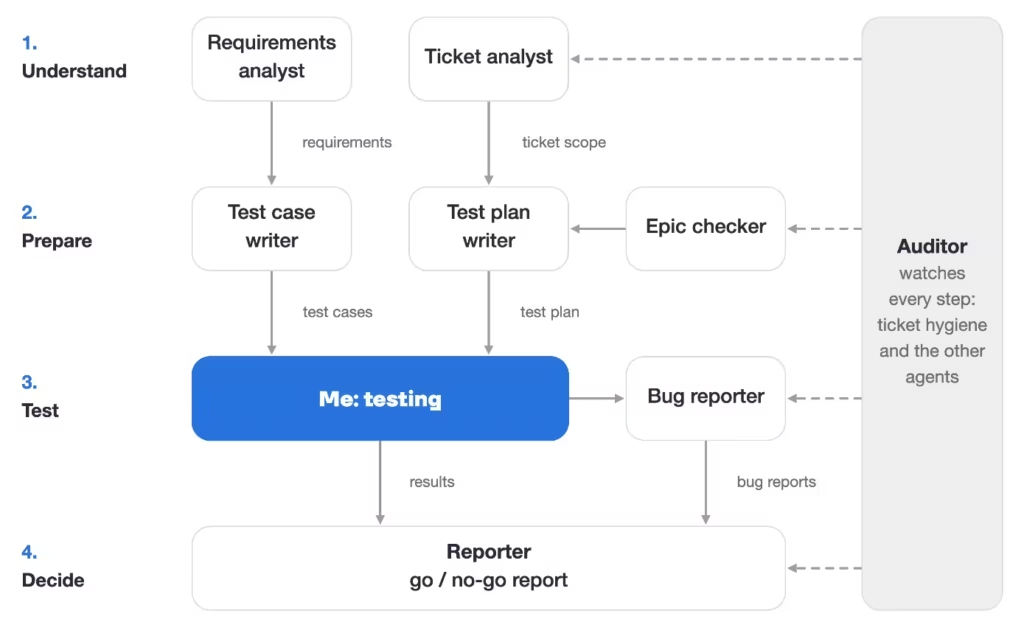
With time, I put together a small team. One agent helps me understand how a feature is supposed to work, a few others write tests and put together plans, and another one turns my screenshots into bug reports. The last agent I have says whether or not we can release, and if not – it explains the problem. I’m still the one handling actual testing, and every agent follows a rule: draft first, then wait for my approval. Nothing gets into Jira without my explicit say-so. I also have an agent that checks the other ones’ work.
Here’s my current agent team composition:
- The requirements analyst. Gathers everything known about a feature: docs, tickets, and conversations;
- The ticket analyst. Finds the ticket, its epic, related tests, and errors from the logs;
- The test case writer. Writes tests for stories;
- The test plan writer. Builds the plan and test runs;
- The epic checker. Ensures every story is covered by tests;
- The bug reporter. Turns screenshots into bug reports;
- The auditor. Keeps tickets in order and keeps an eye on the other agents;
- The reporter. Sums up the plan and says whether we are ready for the release.
And the visual representation of the new, agent-assisted workflow:
These days, I don’t test just the app, but also my assistants, and honestly – that’s the most fun part of the process for me. They make the same kinds of mistakes as an actual new hire would without knowing all the ins and outs yet. My agent picked the oldest of three copies of a test, so I added another rule: “Choose the newest version.” It invented a blocker for testing that didn’t exist – new rule: “No data? Say so.” At another point, it built a great, very detailed test plan, and then stuffed it with over 60 tests. I had to step in and explain that a good test plan isn’t necessarily the one with the most tests in it.
Every mistake becomes another line of clarification for the agent. Find what went wrong, figure out why, and make sure it doesn’t happen again – not much different from ordinary QA work.
Impact on the QA Workflow
The most significant results were visible in Jira. At one point, new mandatory fields appeared in our tickets: without them, the team’s dashboards showed chaos rather than a clear picture. They had to be filled in retroactively, and I had almost 500 of them. By hand – that’s several days of boring clicking. With agents – one day, I saw every single change, and wherever the agent was unsure, it asked me.
As great as that sounds, speed isn’t even the main benefit. I have time to think about testing again, instead of constantly tracking which epic a test plan belongs in, which stories are already covered by tests, and which one of three identical tests is the original, and which are its twins. The paperwork is still being completed, but now it’s done by my secretaries while I approve or correct their results.
If you’ve ever felt like a secretary juggling too many admin processes and didn’t like it, try hiring some virtual assistants of your own. They don’t send résumés, don’t take lunch breaks, and don’t get offended when you correct them.
Don’t automate everything right off the bat. Start with one boring task you do every week and describe it in words you’d use with a new team member – that’s your first agent. At first, allow it to read only: easier on you and on Jira that way. Always validate completed work, and when an agent gets something wrong, don’t quietly fix the result – clarify a rule.
Agents don’t need coding experience. They need someone who knows the workflow and can spot mistakes or discrepancies, and if you ask me – that’s part of a QA engineer’s job description.
There are free courses available that can help you set everything up. I took Anthropic Academy, but OpenAI, Google, and Microsoft offer similar ones.
Explore our blog to read more insights from our experts.
If you seek to hire AI-augmented QA engineers, our team is ready to help you. Contact us to discuss the details.


