




As an AI-powered application grows scales, repeated AI requests often significantly increase AI requests and slow down response time, affecting user experience. This is where caching comes in handy. Instead of performing the same expensive operation every time, an application can temporarily store the result and reuse it when the same request comes in. However, not every caching approach works equally well for different types of requests.
When Traditional Caching Is Not Enough
While working on an AI-powered Node.js application, I encountered a case where choosing the right caching approach was not so straightforward.
The initial functionality was a medication search that allowed users to find information about a specific drug by its name and brand. When the number of requests grew, I introduced caching to optimize application performance. Because the medicine name and brand provided an obvious and consistent cache key (e.g., for a specific MedicineX produced by BrandY, the cache key might be medicineX_brandY), traditional caching was a good fit.
Later, I added AI-powered functionality that enabled users to ask questions in natural language. As the number of requests shot up, so did token usage and related costs. I started looking for a way to avoid repeated AI service requests. However, I realized that traditional caching would not be as effective for this use case. For example, users might ask:
“What are the symptoms of flu?”
“How can I tell if I have the flu?”
“What are the common tell-tale signs of flu?”
Although these questions are phrased differently, they express an extremely similar intent. Traditional caching can’t adequately handle such cases because it looks for exact matches rather than similarity in meaning.
How Semantic Caching Works
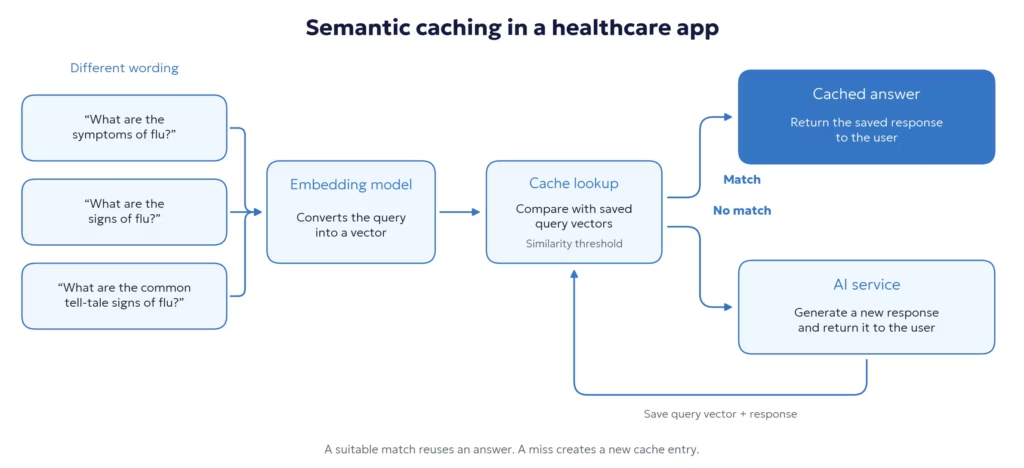
Semantic caching handles semantically similar requests even when they are phrased differently but convey the same intent.
The core logic is as follows:
- User queries are converted into vector representations of their meaning using an embedding model.
- When the user sends a new query, the application creates a vector for it.
- The system compares this vector with those from previously cached queries and calculates a similarity score.
- If there is a good match, the cached response is returned.
- If not, the application sends the query to the AI service and caches the new response for the next time.
Semantic Caching Limitations
Before implementation, I evaluated potential key factors that could affect performance. One of the most important factors was the embedding model. Since semantic caching works by turning user queries into vectors and comparing their similarity, the model you choose affects both matching accuracy and computational cost.
To avoid making extra external AI requests for embeddings, I deployed the embedding model in the cloud. Therefore, the application could generate embeddings, avoiding extra API costs and network-related latency.
The similarity threshold was another key factor. If the threshold is too low, unrelated requests might be considered as similar and get the wrong cached response. If it is too high, the cache hit rate drops, and more requests go to the AI service. So, striking a balance was crucial in this solution to keep semantic caching efficient and reliable.
The Result: 40% Lower AI Costs and 60% Faster Responses
Eventually, I implemented both caching approaches within the application. While traditional caching provided a simple, predictable solution for exact matches, semantic caching enabled the reuse of previously generated responses for semantically similar requests, avoiding the need to make a new AI request each time.
As a result, I was able to reduce token usage and AI-related costs by roughly 40%. More importantly, response times decreased by approximately 60%, improving the user experience and making the application more efficient.
Picking the right caching method isn’t about swapping out traditional caching for a semantic one. It’s about knowing which kinds of requests your app handles and choosing what works best for each. Frequently, using both methods together can boost performance and keep your app efficient, scalable, and cost-effective.
Semantic caching is only one way to reduce AI-related cost and latency. For apps that repeatedly send the same context to an LLM, prompt caching and context-window optimization can address another source of extra token usage.
If you are looking for ways to optimize performance, token usage, or reduce costs, SysGears engineers will help. Contact us to discuss your use case, and we will find the approach that works best for the application.


